
AI Agent Security in 2026: Protecting MCP Servers from Prompt Injection, Data Leaks & Tool Abuse
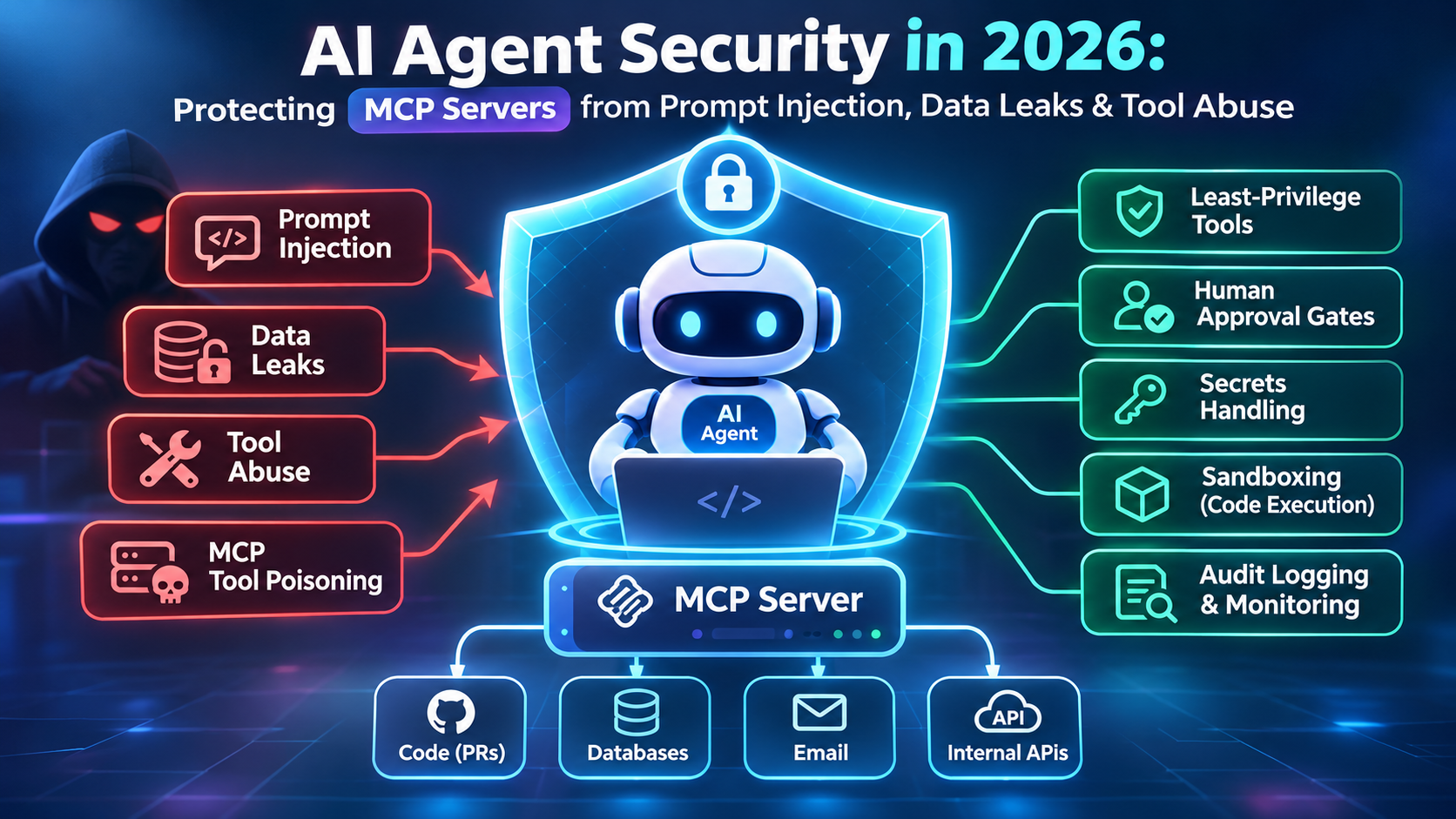
In 2026, AI agents moved from demos into production: they read inboxes, open pull requests, query databases and call internal APIs through the Model Context Protocol (MCP) and similar tool-calling frameworks. That changes the security model. A chatbot that only talks can embarrass you; an agent that can act can be manipulated into acting against you.
The goal is not to avoid agents. The goal is to design the system around the model so that even a fully manipulated agent cannot leak data, spend money or destroy records without passing controls you own.
Secure agent architecture at a glance
1. Why AI agents change the threat model
In a traditional web app, user input arrives and your code decides what happens. In an agent, the model decides which tools to call and with what arguments — and that decision is shaped by everything in its context window.
- User prompts: what the person typed, including deliberate manipulation attempts.
- Retrieved content: web pages, PDFs, emails, tickets and knowledge-base articles.
- Tool results: API responses, database rows and file contents returned to the model.
- Tool descriptions: the names and descriptions MCP servers advertise to the model.
- Conversation memory: earlier turns that may already contain injected instructions.
2. Top threats to AI agents and MCP servers
| Threat | What happens | Primary defense |
|---|---|---|
| Direct prompt injection | User manipulates the agent into bypassing rules | Server-side authorization, not prompt rules |
| Indirect prompt injection | Instructions hidden in documents, pages or tool results | Least privilege, approvals, egress control |
| Excessive agency | Agent has tools far beyond its task | Narrow tools, per-user credentials |
| Data exfiltration | Data leaks via URLs, images, emails or tool calls | Outbound allowlists, output filtering |
| Tool poisoning | Malicious MCP server hides instructions in tool descriptions | Vetted, pinned servers; description review |
| Insecure output handling | Model output executed as SQL, shell or HTML | Strict schemas, parameterization, sandboxing |
| Credential leakage | API keys appear in prompts, outputs or logs | Secrets kept outside the model context |
| Denial of wallet | Loops or abuse burn tokens and API quota | Step limits, rate limits, budget caps |
3. Prompt injection: direct and indirect
Direct injection comes from the person typing into the chat. Indirect injection is more dangerous because the user can be completely innocent — the attack lives inside content the agent retrieves on their behalf.
How an indirect injection attack works
- Delimit untrusted content: wrap retrieved text in clear tags and tell the model it is data, not instructions.
- Strip spoofed delimiters: escape any wrapper tags that appear inside the content itself.
- Use injection classifiers as a signal: useful for alerting and blocking obvious payloads, but not a guarantee.
- Design for failure: assume some injections will succeed and limit what a compromised agent can do.
4. Apply least privilege to every tool
The single most effective control is limiting what the agent can do. For every tool, ask: if an attacker fully controlled this agent, what is the worst this tool allows?
- Prefer narrow tools:
get_invoice(invoice_id)is far safer thanrun_sql(query). - Act as the end user: the agent should inherit the user's permissions, not a service account that can see everything.
- Separate read and write: read-only agents should receive only read tools.
- Take scope from the session: tenant ID and user ID come from the authenticated session, never from model-supplied arguments.
- Limit result size: cap rows and bytes returned so one call cannot dump an entire table.
| Unsafe tool | Safer alternative | Why |
|---|---|---|
run_sql(query) | get_invoice(id) | No arbitrary queries; scope enforced in code |
http_request(url) | fetch_docs_page(slug) | Fixed destination; no exfiltration channel |
send_email(to, body) | draft_email(to, body) | Human sends; agent cannot deliver directly |
shell(cmd) | Sandboxed runner with fixed commands | No host access or credential exposure |
5. Require human approval for high-risk actions
Classify every tool by risk. Low-risk reads can run automatically. Anything that sends data outside the organization, spends money, deletes data or changes permissions should require confirmation from a human who sees the exact tool and raw arguments — not the model's summary of them.
Example tool risk policy
6. Secure the MCP servers you use and build
MCP makes it easy to plug tools into any compatible client — which also makes it easy to plug in something you should not trust. Treat every MCP server like a third-party dependency with direct access to your data.
MCP servers you consume
- Trusted sources only: install servers from publishers you can verify, and review their code where possible.
- Pin versions: never auto-update to latest; review changes before upgrading.
- Read tool descriptions: they are sent to the model and can carry hidden instructions (tool poisoning).
- Watch for silent changes: alert when a server's tool list or descriptions change after an update.
- Isolate local servers: run them in containers with read-only mounts and no unnecessary network access.
MCP servers you build
- Authenticate remote servers: use OAuth with short-lived, scoped tokens.
- Validate token audience: accept only tokens issued for your server, and never pass client tokens through to downstream APIs.
- Validate every argument: strict schemas, reject unknown fields, enforce authorization server-side.
- Bind locally: local HTTP servers should listen on
127.0.0.1, not0.0.0.0, and validate theOriginheader. - Rate-limit: per client, per user and per tool.
Hardened MCP container example
services: mcp-files: image: registry.example.com/mcp-files:1.4.2 # pinned, never :latest read_only: true user: "10001:10001" cap_drop: ["ALL"] security_opt: ["no-new-privileges:true"] volumes: - ./shared-docs:/data:ro # only what it needs networks: [mcp-internal] # no internet egress ports: ["127.0.0.1:8811:8811"] mem_limit: 512m pids_limit: 100 networks: mcp-internal: internal: true7. Keep secrets out of the model context
Anything inside the model's context can end up in its output. API keys, database passwords and tokens should never appear in system prompts, tool descriptions or tool results.
- Credentials at execution time: tools fetch secrets from AWS Secrets Manager, OCI Vault or HashiCorp Vault when they run.
- Reference by ID: the model works with resource identifiers; the tool resolves access.
- Redact results: strip keys, tokens and unnecessary personal data before results return to the model.
- Scrub logs: prompts and completions frequently contain sensitive data — apply retention limits and redaction.
8. Validate model output before anything executes
Model output is untrusted input to the rest of your system. Validate it exactly as you would a form submission from an anonymous user.
- Strict schemas: parse tool arguments with Zod, Pydantic or JSON Schema and reject unknown fields.
- No string-built commands: never concatenate model output into SQL, shell commands or file paths.
- Safe rendering: sanitize model-generated HTML and Markdown, and block auto-loading of external images — a common exfiltration trick.
- Egress allowlist: any tool that makes HTTP requests should only reach approved hosts over HTTPS.
- Recipient rules: internal-only email domains by default; external recipients require approval.
9. Sandbox any code the agent runs
Coding agents and code-interpreter tools execute model-written code. Assume that code is hostile.
| Control | Recommendation |
|---|---|
| Isolation | gVisor or Firecracker microVMs; at minimum a locked-down container |
| Network | No network by default; never reach cloud metadata (169.254.169.254) |
| Filesystem | Read-only root, small writable tmpfs, only the job folder mounted |
| Resources | CPU, memory, PID and wall-clock limits on every run |
| Identity | Non-root user, all Linux capabilities dropped |
| Lifecycle | Ephemeral — destroy the sandbox after each session |
10. Control cost and runaway loops
Agents can loop, retry endlessly or be deliberately abused to burn tokens and third-party API quota — sometimes called a denial-of-wallet attack.
- Step limits: cap tool calls per task and per session.
- Token budgets: per user, per tenant and per day, with hard stops.
- Rate limits: on both the chat endpoint and individual tools.
- Timeouts: every tool call and every agent run should have a deadline.
11. Log, monitor and audit every action
When an agent does something unexpected, you need to reconstruct exactly why: who asked, what the model saw, what it decided, and what actually executed.
- Every tool call: user, tenant, tool, risk level, argument hash, approval decision and result.
- Context sources: which documents, pages or records were in context when the decision was made.
- Rejected actions: schema failures, blocked domains and denied approvals.
- Token and cost usage: per session and per tenant.
Alert on these patterns
- Spikes in rejected approvals or schema validation failures.
- Requests to non-allowlisted domains.
- Unusually long tool-call chains or repeated loops.
- Token usage far above a session's normal baseline.
- External-facing tool calls immediately after retrieving untrusted content.
A practical rollout path
| Stage | Agent capability | Required controls |
|---|---|---|
| Stage 1 | Read-only assistant over internal docs | Scoped retrieval, user permissions, logging |
| Stage 2 | Read tools over business data | Narrow tools, tenant scoping, result redaction |
| Stage 3 | Internal write actions | Schemas, audit trail, step limits |
| Stage 4 | External actions (email, HTTP, payments) | Human approval, egress allowlist, red-teaming |
| Stage 5 | Autonomous multi-step workflows | Sandboxing, budgets, anomaly alerts, kill switch |
AI agent security checklist
- ✓ The model is treated as untrusted; security is enforced in code, not prompts.
- ✓ Tools are narrow and task-specific; read and write tools are separated.
- ✓ The agent acts with the end user's permissions; tenant scope comes from the session.
- ✓ External, financial and destructive actions require human approval with raw arguments shown.
- ✓ MCP servers come from trusted sources, are version-pinned and have reviewed tool descriptions.
- ✓ Remote MCP servers use OAuth with audience validation and short-lived tokens.
- ✓ Secrets never enter the model context; tool results are redacted and size-capped.
- ✓ All tool arguments are validated against strict schemas.
- ✓ Outbound network access is restricted to an allowlist.
- ✓ Model-written code runs only in isolated, resource-limited, ephemeral sandboxes.
- ✓ Step limits, rate limits and token budgets prevent runaway cost.
- ✓ Every tool call is audited and anomalous behavior triggers alerts.
- ✓ Injection red-team tests run before every release.
Common questions
AI agents are valuable precisely because they can take action — and that is exactly what makes them a security concern. You cannot prompt your way to safety.
Assume the model will eventually be manipulated, then build the surrounding system so a manipulated model has narrow permissions, needs human sign-off for anything dangerous, cannot reach secrets or arbitrary destinations, and leaves a clear audit trail. Get those fundamentals right and you can ship agents that are both useful and safe in production.