
Cyber Security
ASP.NET Core Authentication & Authorization: JWT, OAuth2, and CORS (2026)
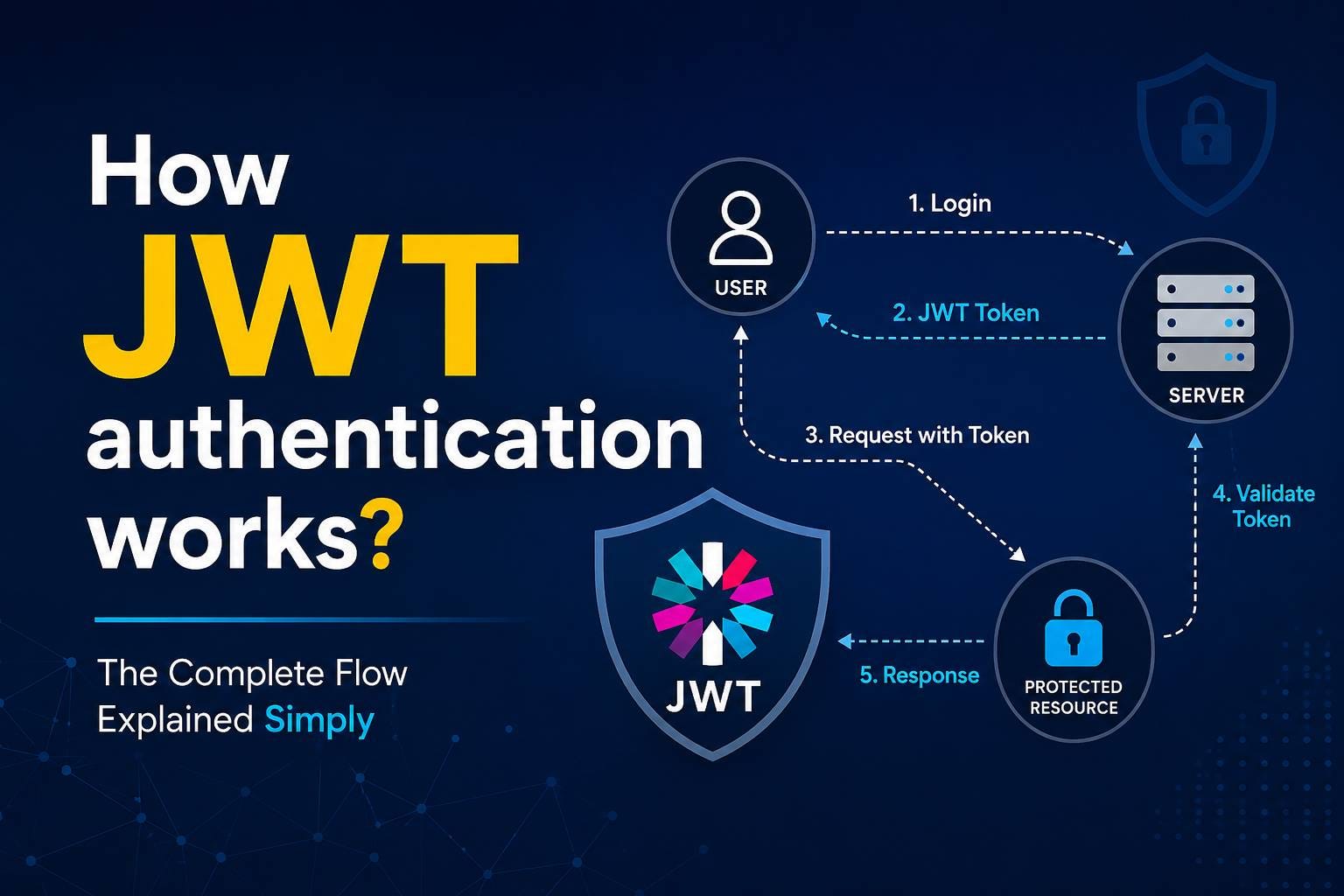
Authentication and authorization are the gatekeepers of your application. Get them wrong, and you've either locked out legitimate users or exposed data to strangers. This guide covers patterns that balance security and usability in production ASP.NET Core applications.
JWT Authentication with Bearer Tokens
Add JWT authentication to your middleware:
// Program.cs
builder.Services.AddAuthentication(JwtBearerDefaults.AuthenticationScheme)
.AddJwtBearer(options=>
{
options.TokenValidationParameters=newTokenValidationParameters
{
IssuerSigningKey=newSymmetricSecurityKey(Encoding.UTF8.GetBytes(secretKey)),
ValidateIssuer=false,
ValidateAudience=false
}
});
app.UseAuthentication();
builder.Services.AddAuthentication(JwtBearerDefaults.AuthenticationScheme)
.AddJwtBearer(options=>
{
options.TokenValidationParameters=newTokenValidationParameters
{
IssuerSigningKey=newSymmetricSecurityKey(Encoding.UTF8.GetBytes(secretKey)),
ValidateIssuer=false,
ValidateAudience=false
}
});
app.UseAuthentication();
Generate JWT on Login
public stringGenerateToken(Useruser)
{
varclaims=new[]
{
newClaim(ClaimTypes.NameIdentifier,user.Id.ToString()),
newClaim(ClaimTypes.Email,user.Email),
newClaim(ClaimTypes.Role,user.Role)
};
varkey=newSymmetricSecurityKey(Encoding.UTF8.GetBytes(_jwtSecret));
varcreds=newSigningCredentials(key,SecurityAlgorithms.HmacSha256);
vartoken=newJwtSecurityToken(
expires:DateTime.UtcNow.AddMinutes(15),
claims:claims,
signingCredentials:creds
);
returnnewJwtSecurityTokenHandler().WriteToken(token);
}
{
varclaims=new[]
{
newClaim(ClaimTypes.NameIdentifier,user.Id.ToString()),
newClaim(ClaimTypes.Email,user.Email),
newClaim(ClaimTypes.Role,user.Role)
};
varkey=newSymmetricSecurityKey(Encoding.UTF8.GetBytes(_jwtSecret));
varcreds=newSigningCredentials(key,SecurityAlgorithms.HmacSha256);
vartoken=newJwtSecurityToken(
expires:DateTime.UtcNow.AddMinutes(15),
claims:claims,
signingCredentials:creds
);
returnnewJwtSecurityTokenHandler().WriteToken(token);
}
Role-Based Access Control
Require authentication and check roles:
[Authorize]
[Authorize(Roles="Admin")]
[HttpDelete("orders/{id}")]
public asyncTask<IActionResult> DeleteOrder(intid)
{
// Only authenticated users with Admin role can call this
varorder=await_db.Orders.FindAsync(id);
_db.Orders.Remove(order);
await_db.SaveChangesAsync();
returnNoContent();
}
[Authorize(Roles="Admin")]
[HttpDelete("orders/{id}")]
public asyncTask<IActionResult> DeleteOrder(intid)
{
// Only authenticated users with Admin role can call this
varorder=await_db.Orders.FindAsync(id);
_db.Orders.Remove(order);
await_db.SaveChangesAsync();
returnNoContent();
}
CORS Configuration for SPAs
Allow frontend SPA to call your API:
builder.Services.AddCors(options=>
{
options.AddPolicy("AllowSpa",builder=>
{
builder
.WithOrigins("https://ajishstephen.com")
.AllowAnyMethod()
.AllowAnyHeader()
.AllowCredentials();
});
});
app.UseCors("AllowSpa");
{
options.AddPolicy("AllowSpa",builder=>
{
builder
.WithOrigins("https://ajishstephen.com")
.AllowAnyMethod()
.AllowAnyHeader()
.AllowCredentials();
});
});
app.UseCors("AllowSpa");
Authentication and authorization decisions compound across your entire system. Get the fundamentals right, and the rest follows. This is the kind of security architecture I help teams build as part of custom software development services.
Common questions
Is JWT secure for storing sensitive data?
No. JWT tokens are signed but not encrypted—anyone can base64-decode the payload and read it. Never store passwords, credit card numbers, or secrets in JWT. Use JWT for claims that are safe to expose (user ID, roles, email). For sensitive data, fetch it from the database at request time.
Should I store JWT in localStorage or cookies?
Cookies with HttpOnly and Secure flags are safer—JavaScript can't steal them via XSS. localStorage is simpler but vulnerable to XSS attacks. For SPAs, HttpOnly cookies are the modern standard. For mobile apps, secure local storage is fine.
How short should JWT expiry times be?
15 minutes for access tokens is standard. Use a refresh token (longer-lived) to get a new access token without re-authenticating. If a token is compromised, it expires in 15 minutes; the attacker can't use it indefinitely.
Do I need to revoke tokens if a user logs out?
With short expiry times (15 min), logout can be client-side only (delete the token). The server doesn't need a revocation list. With longer tokens, maintain a blacklist so the server rejects tokens after logout. Short expiry is simpler and more secure.
Building a secure authentication system?
I help teams implement authentication that protects both users and your system.
Explore Custom Software Development →
© Copyright 2024
Ajish
Stephen