
Database Architecture for Large Applications: Scaling, Replication, Sharding & Caching (2026)
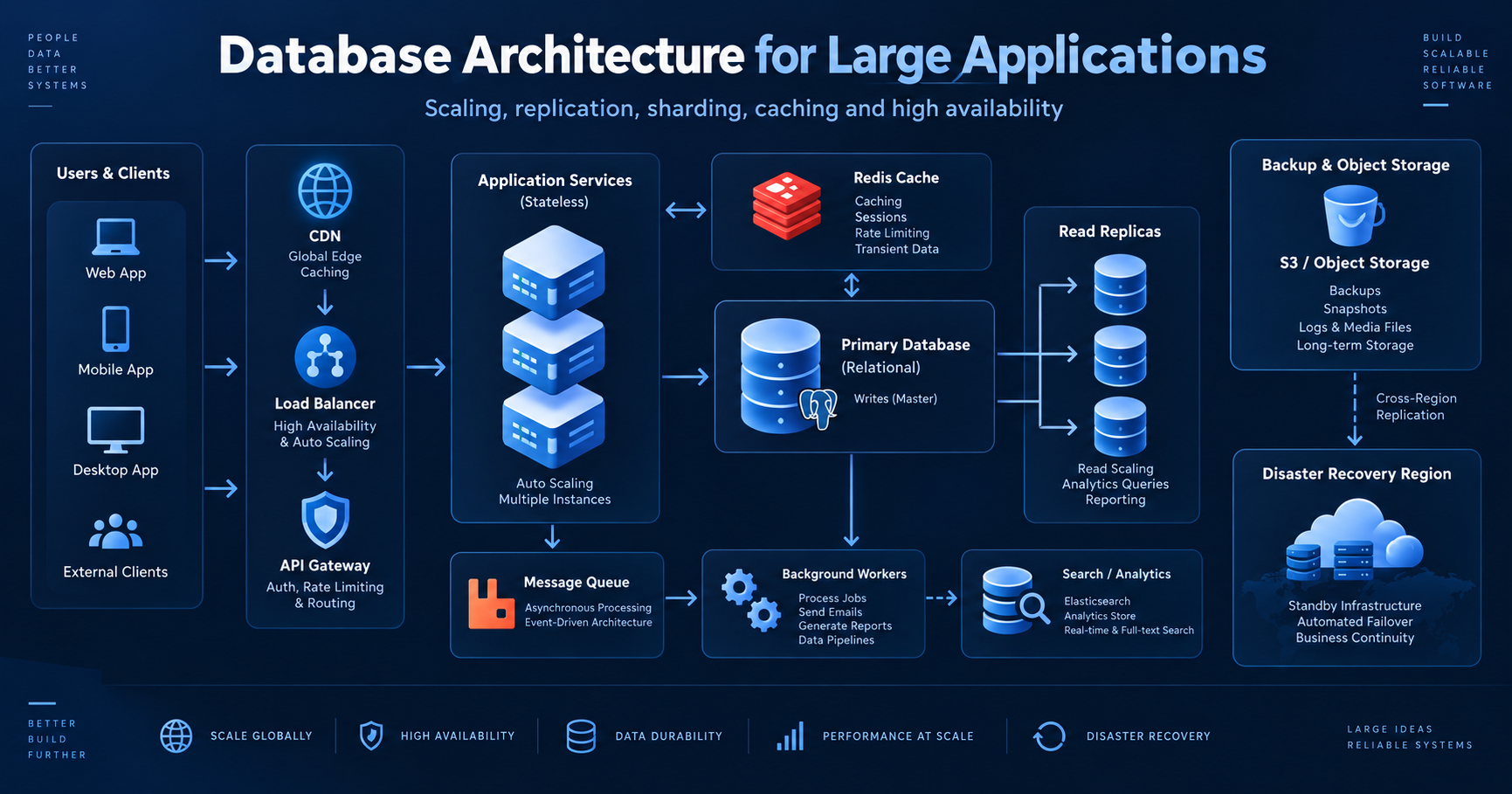
A database that works perfectly for a small application can become the biggest bottleneck once traffic, data volume, and product complexity increase. At scale, database architecture is no longer only about choosing PostgreSQL, MySQL, MongoDB, or another engine. It becomes a system-design problem involving read/write patterns, replication, partitioning, caching, asynchronous processing, consistency, observability, backups, and failure recovery.
The goal is not to make the database architecture complicated from day one. The goal is to create clear boundaries so the system can scale step by step without forcing a complete rewrite every time traffic grows.
Architecture at a glance
1. Start with access patterns, not database brands
Before selecting a technology, list the application's most important read and write patterns. Large systems fail when the database model is designed around tables alone instead of the real operations the application performs.
- Transactional writes: orders, payments, account changes, permissions and other operations that require correctness.
- Hot reads: dashboards, user profiles, product pages and frequently requested reference data.
- Search workloads: full-text search, filtering, ranking and faceted queries.
- Analytics workloads: large scans, aggregation, reporting and historical trends.
- Background workloads: notifications, exports, indexing, audit processing and integrations.
2. Separate transactional data from specialised workloads
The primary OLTP database should focus on fast, consistent transactions. Search, analytics and long-running reporting queries should gradually move to systems designed for those workloads so they do not compete with user-facing requests.
| Workload | Best fit | Typical examples | Why |
|---|---|---|---|
| OLTP / transactions | PostgreSQL / MySQL | users, orders, invoices | ACID transactions and relational integrity |
| Cache | Redis | sessions, hot objects, counters | sub-millisecond reads and TTLs |
| Search | OpenSearch / Elasticsearch | full text, filters, ranking | inverted indexes and search features |
| Analytics | Warehouse / column store | BI, dashboards, historical trends | efficient scans and aggregation |
| Large objects | Object storage | documents, images, exports | cheap durable storage outside DB rows |
3. Scale reads with replicas
Read replicas are often the first major scaling step. The application writes to the primary database and sends suitable read-only traffic to replicas. This reduces pressure on the primary and creates a cleaner path for horizontal read scaling.
- Use the primary for: writes, transactions, lock-sensitive operations, and read-after-write flows that must immediately see the latest data.
- Use replicas for: dashboards, history pages, reporting, catalogue browsing, and other reads that can tolerate small replication lag.
- Plan for lag: replicas are usually eventually consistent. Do not route a request to a replica immediately after a critical write unless your application handles stale reads.
Example routing policy
4. Use connection pooling before adding more database servers
A large application can overwhelm a database even when the SQL is efficient if every application process opens too many connections. Connection pools reuse a controlled number of database connections and protect the server from connection storms.
- Set a bounded pool size per application instance. Avoid unlimited connection creation.
- Use a pooler such as PgBouncer when appropriate. This is especially useful with many stateless services or serverless workers.
- Set query and idle timeouts. A stuck request should not hold a connection indefinitely.
- Monitor pool saturation. Waiting for a connection can look like a slow database even when the database itself is healthy.
5. Cache repeated reads, but keep the database as the source of truth
Caching can remove enormous read load from the database, but a cache should be treated as an acceleration layer rather than the authoritative copy of business data.
Cache-aside pattern — common cache flow
- 1Application checks Redis for the key.
- 2If present, return cached value.
- 3If missing, query the database.
- 4Store the result in Redis with a TTL.
- 5On data change, invalidate or update the cache.
- Use TTLs: avoid values remaining stale forever.
- Use namespaced keys: for example
tenant:42:user:1001. - Protect against cache stampede: use request coalescing, locks, stale-while-revalidate, or jittered TTLs for hot keys.
- Do not cache everything: cache data with high read frequency and a clear invalidation strategy.
6. Partition or shard only when one database can no longer carry the workload
Sharding is powerful, but it makes joins, transactions, migrations, reporting, operational tooling and debugging harder. Use it when vertical scaling, query tuning, caching, archiving, replicas and partitioning are no longer enough.
| Technique | What it means | Use when |
|---|---|---|
| Table partitioning | One logical table split into partitions inside the same database system. | Very large tables, time-series data, archiving, pruning old ranges. |
| Sharding | Data split across independent database servers or clusters. | A single database node or cluster cannot meet capacity or throughput needs. |
Choosing a shard key
A shard key should distribute load evenly and keep related data together. Common choices include tenant ID, customer ID, account ID, or a hash of an identifier. Avoid keys that send most traffic to one shard.
7. Design indexes around real queries
Indexes are one of the highest-value scaling tools, but every index has a write and storage cost. Index columns used in filters, joins, sorting and uniqueness checks, then verify their value using the query planner.
- Composite indexes: match the common filter and sort order rather than indexing every column independently.
- Partial indexes: index only active or relevant rows when the database supports it.
- Covering indexes: include columns needed by a hot query so the engine can avoid extra table lookups.
- Avoid over-indexing: too many indexes slow inserts and updates and increase maintenance work.
PostgreSQL example
8. Control consistency deliberately
Large architectures often contain systems with different consistency guarantees. The transactional database may provide strong consistency while replicas, caches, search indexes and analytics pipelines update asynchronously.
- Strong consistency: use for payments, balances, permissions, inventory reservations and other correctness-critical decisions.
- Eventual consistency: acceptable for search indexes, activity feeds, analytics and some dashboards.
- Idempotency: make retries safe by giving important operations stable idempotency keys.
- Outbox pattern: store a business change and its event in the same database transaction, then publish the event asynchronously.
Transactional outbox concept
9. Move slow work to queues and background workers
A user request should not wait for email delivery, PDF generation, search indexing, large imports, third-party retries or analytics processing. Put that work on a queue and let workers process it independently.
- Request path: validate, persist critical state, return quickly.
- Worker path: process non-critical or long-running tasks asynchronously.
- Retry policy: use exponential backoff and dead-letter queues for repeated failures.
- Idempotent jobs: a worker should be safe to retry without creating duplicate records or payments.
10. Separate operational reporting from production queries
Large reporting queries can consume CPU, memory, I/O and locks that user-facing requests need. As reporting grows, copy data into a warehouse, analytics database or reporting replica.
- Operational dashboard: small recent queries can often use a read replica.
- BI and historical analytics: prefer a warehouse or column-oriented analytical store.
- Search and filtering: use a search engine when relevance, full-text search or complex faceting dominates.
- Exports: generate large exports asynchronously from replicas or analytics stores.
11. Plan for high availability and disaster recovery
A scalable database that cannot recover from a failure is not production-ready. High availability handles local failures; disaster recovery handles larger events such as region failure, data corruption or accidental deletion.
- Automated failover: promote a healthy replica when the primary becomes unavailable.
- Point-in-time recovery: retain write-ahead logs or equivalent transaction logs so you can restore to a specific moment.
- Cross-region backup: keep recovery data outside the primary failure domain.
- Restore testing: a backup is only useful if you have tested restoring it.
- RPO and RTO: define how much data loss is acceptable and how quickly service must be restored.
12. Add observability before the system becomes hard to debug
At scale, the question is rarely only "is the database up?". You need to know which queries are slow, which endpoints generate them, whether the connection pool is saturated, whether replicas are lagging, and whether one tenant is consuming disproportionate resources.
- Query latency: p50, p95 and p99, not only averages.
- Slow query log: capture expensive or unexpectedly frequent statements.
- Connection usage: active, idle, waiting and pool queue time.
- Replica lag: measure seconds/bytes behind the primary.
- Cache hit ratio: low hit ratio may mean the cache is ineffective.
- Locks and deadlocks: track blocked transactions and lock wait time.
- Storage growth: monitor table, index and WAL/log growth before disks become critical.
13. Design multi-tenant data boundaries explicitly
Multi-tenant applications have an additional architecture decision: how tenants share or isolate database resources. The right model depends on compliance, operational complexity, tenant size and expected scale.
| Model | Isolation | Operational cost | Good fit |
|---|---|---|---|
| Shared tables + tenant_id | Logical | Low | Many small tenants, simpler operations |
| Schema per tenant | Medium | Medium | Stronger logical separation and tenant-specific schema operations |
| Database per tenant | High | High | Large or regulated tenants, dedicated performance boundaries |
| Hybrid | Variable | Medium–High | Small tenants shared; large tenants moved to dedicated databases |
A practical evolution path
| Stage | Architecture | Focus |
|---|---|---|
| Stage 1 | One relational database | Clean schema, correct indexes, backups, connection pool, monitoring. |
| Stage 2 | Add Redis and read replicas | Reduce repeated reads and move safe read traffic away from the primary. |
| Stage 3 | Add queue/workers and search/analytics stores | Separate long-running and specialised workloads. |
| Stage 4 | Partition large tables | Control very large datasets and improve pruning/maintenance. |
| Stage 5 | Shard only where required | Split capacity by tenant/customer/key when one database boundary is insufficient. |
Database architecture checklist
- ✓ Primary transactional database has automated backups and tested restore procedures.
- ✓ Database connections are pooled and bounded.
- ✓ Hot queries have appropriate indexes verified with execution plans.
- ✓ Pagination is enforced for large list endpoints.
- ✓ Read replicas are used only for reads that can tolerate replication lag.
- ✓ Redis or another cache is used for high-value repeated reads with a clear invalidation strategy.
- ✓ Long-running tasks are handled by queues and background workers.
- ✓ Search and analytics workloads do not overload the transactional primary.
- ✓ Large tables have an archiving or partitioning strategy.
- ✓ Multi-tenant isolation rules are enforced in every query path.
- ✓ Slow queries, lock waits, connection saturation, cache hit ratio and replica lag are monitored.
- ✓ Failover, point-in-time recovery, RPO and RTO are documented.
- ✓ Sharding is introduced only when simpler scaling techniques are insufficient.
Common questions
The best database architecture is not the one with the most components. It is the one that keeps the critical path simple, protects correctness, scales the dominant workloads independently, and gives the engineering team enough visibility to understand failures before they become outages.
Start with a strong relational core, make queries and connections efficient, add caching and replicas when needed, separate specialised workloads, and treat sharding as a later-stage tool rather than a starting point.